From CPTS to OSCP+: Using the Sword to Slay the Dragon​

From CPTS to OSCP+: Using the Sword to Slay the Dragon

From CPTS to OSCP+: Using the Sword to Slay the Dragon

So I passed the OSCP+ WOOHOO!!!. Now it's time for me to help you do the same.

A lot of the OSCP+ posts I have seen are obligatory, and don't really paint the whole picture. I found that I had to look at a large number of "I passed" medium articles, Reddit posts, etc., before I had the whole picture of what I needed to do.

The short version of my prep path

My primary prep was the Hack The Box CPTS pathway (Certified Penetration Testing Specialist).

I did CPTS first. It took me about 7 months to finish the training material in that path. Then I took the CPTS exam and passed.

After that, I purchased the OffSec learning material and reviewed it quickly. I took note of the differences between the CPTS material and the Pen-200, then proceeded directly to the proving grounds and challenge labs.

Hot take, I don't think the learning material is all that important once you have done the HTB pathway. As everyone says, the main thing is getting a feel for the Offsec machines through Proving Grounds and the Challenge labs OSCP-A, OSCP-B, and OSCP-C. Of course, it's recommended to do the entire course because there's never any harm in learning. But for the purposes of the exam, you don't really need the Pen-200 course past skimming. Although it is good to have the Pen-200 course PDF open in another tab while you do the exam.

I noticed a lot of people who pass usually do something like 40 to 70 Proving Grounds machines, plus boxes from lists like TJ Null or LainKusanagi.

TLDR Prep: HackTheBox CPTS pathway > IppSec CPTS machine playlist (about 20 machines) > BRM's report writing blog post > CPTS > skimmed Pen-200 > 40-ish machines (TJ Nulls or LainKusanagi's) > OSCP-A, B, and C > 10 more machines > OSCP-A again, but with the sole purpose to make note of every check you do during the practice > OSCP+. NOTE: Throughout your entire practice, you will be making your own field manual. BRM has a damn near divine guide for doing this.

How many machines did I do (and what kinds)

I noticed a lot of people who pass usually do something like 40 to 70 Proving Grounds machines, plus boxes from lists like TJ Null or LainKusanagi.

My numbers were roughly:

  • About 35 Proving Grounds machines
  • About 25 HackTheBox machines from TJ Null / LainKusanagi-type lists
  • Plus about 20 other HTB machines earlier, while prepping for CPTS (I used IppSec playlists a lot for those while learning)

In summary, I completed a considerable number of machines, but I did not follow the approach of using exclusively OffSec materials or labs.

One random thing I noticed in Proving Grounds

When I was doing the proving grounds, I noticed a lot of their machines have common patterns that are not found on HTB. Here's a wonderful bullet list of weird niche things:

  • log poisoning + lfi to RCE
  • ssh-keygen to create keys, then exploiting something to force the SSH keys into the .ssh directory of a user.
  • Really looking at the contents of a website to give you an idea of what your intended attack path is. For example, the box Nagoya had something similar to "Created 2023" on the hosted webpage that was actually meant to be used in password spraying.
  • You have a valid password and have already achieved initial access as a low-level user. There are many different access vectors for the machine (ssh, evil-winrm, smb, ftp, etc.) , but none of them work. Try it locally (Invoke-RunasC.ps1, or su user)
  • A weird port number you have literally never seen or heard of, in PG, this has consistently been the intended access point.

The biggest thing that helped me: Windows privilege escalation

If I had to name the biggest thing that helped me pass, it was getting better at Windows privilege escalation. Not Linux. Windows.

Because the Active Directory set is weighted so heavily, it's a really good idea to level up anything Windows-related. Especially:

  • Being able to read a ton of output from WinPEAS without getting overwhelmed
  • Knowing what's signal vs noise
  • Being comfortable with PowerUp.ps1-type checks
  • Understanding practical "I have creds, now what?" stuff, like using tools that give you semi-interactive execution with RunAs (Invoke-RunasCs.ps1, etc.)

You don't want to lose out on Active Directory for something that's not even AD and is instead privesc.

What I'd recommend for the highest ROI OSCP+ prep

If your goal is specifically to pass OSCP+ as efficiently as possible, I genuinely think the best prep is:

  • Do the AD machines from TJ Null / LainKusanagi-style lists.
  • Do the OSCP Challenge Labs A, B, and C
  • Get enough reps overall (I'd say 45 to 65 machines is a good target)
  • Have a genuinely good field manual for testing, not some 1-page "Here are possible commands you can run."
  • Redo the OSCP A or B and note down every step you take, as well as what you could try from where you are. Then use this in the actual exam.

If you're not very knowledgeable yet and you're basically going straight into OSCP material without having a solid base, I'd recommend HTB modules to build fundamentals fast. The ones I think matter most:

  • Active Directory Enumeration & Attacks
  • Password attacks
  • Windows privilege escalation
  • Linux privilege escalation
  • Using CrackMapExec (pretty cool stuff in this one)

If your Linux enumeration and baseline privesc instincts are already decent, you don't need to obsess about Linux for months. You just need consistency.
In reality, I think OffSec cares more about the initial access rather than privilege escalation.

What my exam looked like (and why I think CPTS overprepared me for AD)

During my exam, it took me about 6 hours to get enough points to pass (70 points).

I compromised the entire Active Directory set in a little under 2 hours, which is pretty fast. And honestly, I believe CPTS significantly overprepared me for the AD portion of the OSCP+ exam. I got only the local flags on the other standalone machines.
AD is such an important part of the exam; you should really use it to your advantage. Active directory attacks are usually straightforward (at least at this level).

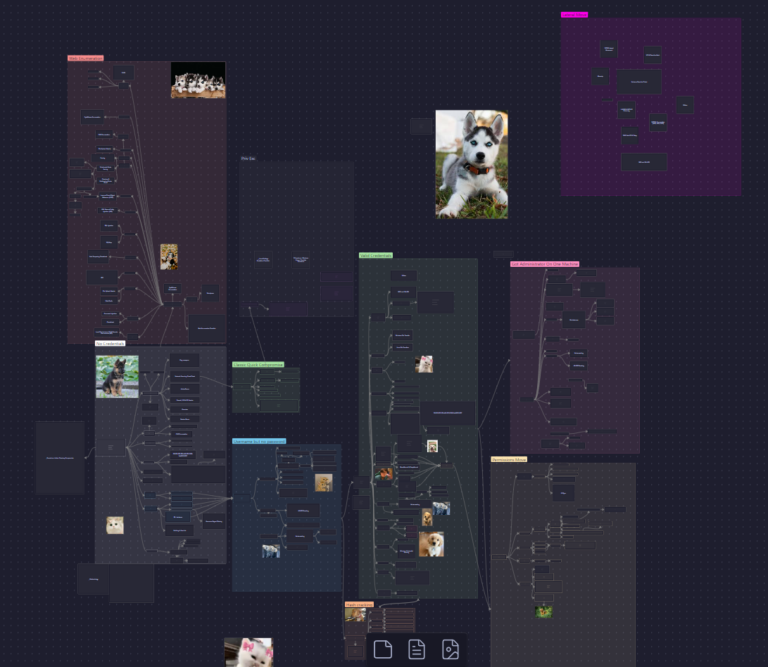
And having a good methodology will make it easy. The way I got my methodology was by taking the .svg file found on this GitHub repo, and then just adding to it as I learned more things.
https://raw.githubusercontent.com/esidate/pentesting-active-directory/a8e37705542720cb1f9b65ec9039f67b70b61ca6/v2/pentesting_active_directory.svg
Here is what my methodology looks like in Obsidian (Don't mind the dog pics, they are strategic):

Timeboxing and switching machines (don't hyperfocus yourself into failing)

I have talked to a few people who have failed the exam by focusing too heavily on a machine they are not good enough to hack. Yes, ideally, you compromise the entire active directory set in an hour, but if you are 5 hours in and you don't even have flag 2 of the AD set, you should have already pivoted to one of the standalones, at least for a little bit.

Before the exam, I set hard rules for me to follow should I struggle on any machines.
My rule was:

  • Max 3 hours on the first part of the AD portion. If I make no progress, I move to standalones.
  • Then about 2 hours per standalone. No progress, move to the next one.

I didn't end up having to enforce those rules, thankfully, but having them mattered. If you don't walk in with a plan, it's extremely easy to get trapped in a "maybe this is it" rabbit hole for 6 hours, and suddenly the day is gone.

For me, the "switch trigger" was when I hit that feeling of:

"I have absolutely no clue what I'm doing anymore."
"Nothing I'm trying is moving the needle."
"I'm doing something endlessly for no reason."

If you are not even following a thread and you are just wildly trying things, maybe you need to pivot or think about the bigger picture of the machine. Usually, ask yourself, "What is standing out about this machine?"

Notes are not optional, seriously.

Note-taking is ridiculously important.

I'm probably going to post an image of my Active Directory methodology in this blog post because it shows what I mean. You need a process that tells you where you can go from where you are, at all times.

Because hacking has too many possible actions. If you ever hit a point where you're like "I don't know what I'm supposed to do," you're not out of options. You're out of structure.

Also, during the exam:

If you see something that looks promising and you later decide it's not the path, don't mentally delete it.

Keep those artifacts in your notes (creds, weird endpoints, configs, usernames, anything). You might've missed one detail, and coming back later with fresh eyes is how you unlock stuff.

"It's an enumeration exam" (kinda yes, kinda no)

People always say OSCP is an enumeration exam. I kind of disagree, but I get what they mean.

Enumeration doesn't just magically reveal "do X and win." What it does is give you a strong jumping-off point for your next best guess.

You scan, you enumerate, you check versions, you run basic service checks, you look for obvious weak configs, you test common paths, you build hypotheses.

Good enumeration narrows the search space. It doesn't hand you the answer.

Also, one thing I've noticed: OffSec is very biased toward Exploit-DB. In the majority of Proving Grounds machines I've done, if the intended path is "use a public exploit," it's usually on Exploit-DB. And their course material pushes you toward that mindset.

So yes, check Exploit-DB. It's not cheating. It's literally what they teach and what their ecosystem often rewards.

If I had to give 5 tips for someone testing in 30 days

  • Do OSCP Challenge Labs A, B, and C like mock exams
  • After each lab/box, write down your exact thought process so you can reuse it.
  • Reduce mental load; you want "next steps" to be automatic.
  • Do 2 to 3 machines a day until you've got ~40 to 60 boxes
  • Repeat the Challenge Labs (A and B felt the closest to the exam for me)

Also, don't forget the "stupid" basics:

  • Try default creds
  • Consider UDP scanning when it makes sense.
  • Re-scan if something feels off.

Cleaning your area helps.

This is not some deep productivity theory. I just noticed that when my room was clean and my environment was clean, I got more done and my brain felt less scrambled.
Cluttered desk = cluttered mind
Clear desk = clear mind
It's as simple as that...

Exam stability (yeah...)

I'm just gonna say it: the exam machines ARE unstable. Don't lose hours fighting something that isn't your fault. I genuinely had to use 12 of the 24 machine reverts during the exam. And I was only hacking for 6 hours. There was one machine that would completely fall apart if you so much as sneezed on it. So keep this in mind when you go in, revert, revert, revert. If you think you have the intended path and it's not working, revert. And one thing that really helps, for verifying code execution, it's not recommended to start with some huge, high-resource-usage reverse shell. Start with something like a phone home, ping your attack box, and see if you can capture the ICMP with either Wireshark or tcpdump. Then you will have confirmation of the intended path.

Final thoughts

If you're stressing yourself out thinking OSCP+ is impossible, it's not.

The key is reps + a real methodology. You want to walk into the exam knowing exactly what you do when:

  • You have no creds
  • You have a username but no password.
  • You have valid creds, but no shell.
  • You have a shell but no privilege.
  • You've got one host, but can't reach the next.
  • You're stuck and need to pivot.

I kid you not, I have talked with people who have failed the exam over 6 times, and I personally believe it's because they cannot answer questions like this. This is why you NEED a good methodology. There is no if ands or buts about this; the methodology is the most important thing. If you want a good example of a field manual, I highly recommend checking out Bruno Rochamoura's field manual: https://field-manual.brunorochamoura.com/manual/

When you reduce mental load, you get your creativity back. And that's what actually wins you points.


From CPTS to OSCP+: Using the Sword to Slay the Dragon​

From CPTS to OSCP+: Using the…

From CPTS to OSCP+: Using the Sword to Slay the Dragon From CPTS to OSCP+: Using the Sword to Slay the Dragon So I passed the OSCP+ WOOHOO!!!. Now it’s time for me to help…

Penetration Testing Writeup: “Active” (Retired Machine from HackTheBox)

Penetration Testing Writeup: “Active” (Retired Machine…

Executive Summary This report summarizes a penetration test conducted against a Windows Active Directory environment. The testing identified critical vulnerabilities including the storage of administrative credentials in Group Policy Preferences (GPP) and weak password policies,…

My Methodology for Passing Any Certification in Under 2 Months

My Methodology for Passing Any Certification…

My Methodology for Passing Any Certification in Under 2 Months Hello! I wanted to share my methodology for earning certifications and learning efficiently without sacrificing quality. Over the years, I’ve developed a system that helps…

More Info

Contact me here 👇

Quick Links

© 2024 Created with Royal Elementor Addons